Productivity & Personal Tools

autorec
Local meeting recorder with no bots and no cloud upload
A desktop app that records and transcribes Zoom, Teams, and Google Meet calls on your machine with optional AI summaries, no bot in the call, and no cloud
Overview
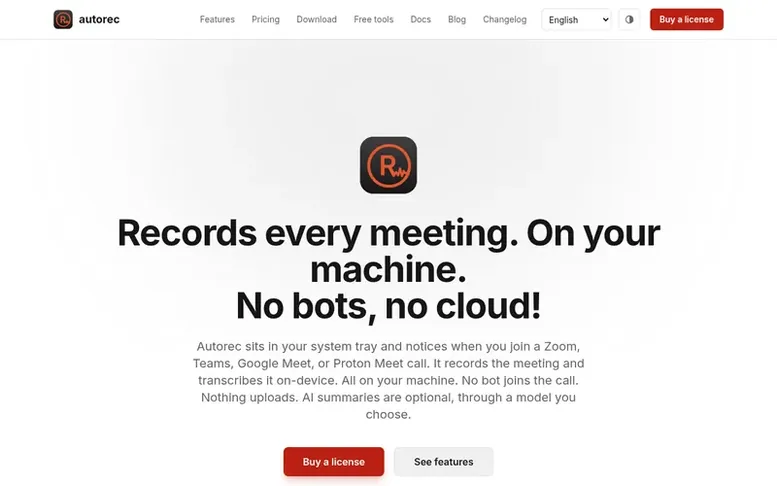
The autorec homepage
Autorec is a desktop application for Linux, Windows, and macOS that automatically detects and records your Zoom, Teams, Google Meet, Proton Meet, Jitsi, Signal, Element, and Telegram calls. The app sits in your system tray and records meetings with local transcription in 17 languages, generating subtitle files. You can optionally connect AI services of your choice to auto-generate titles and summaries from transcripts.
All processing happens on your machine with no cloud upload or telemetry. The app includes a built-in searchable video library with card and table views, and offers tools to trim and compress recordings. Recordings are saved as standard .mp4 files on your disk in a folder you choose.
Capabilities
- Automatic meeting detection for Zoom, Teams, Google Meet, Proton Meet, and Jitsi
- Local recording to standard .mp4 files with GPU acceleration when available
- Optional AI-generated titles and summaries with your own API key or local model
- Built-in searchable video library with card and table views
- Trim and compress recordings to save disk space
- Window-specific capture instead of full-screen recording
- System tray integration for always-on detection
- Webhooks and automation to external services like Notion and Zapier
- Smart audio ducking to balance conversation levels
Pricing
Pricing model: Freemium
Free tier: 3 recordings per 24 hours, up to 40 minutes each. Pro: one-time purchase per major version to unlock unlimited recordings with no length limit.
Follow autorec to get an email when they post a milestone, ship a new product or add a demo video.
autorec fact sheet
| Community votes | 0 |
|---|---|
| Website | autorec.app |
autorec metrics
Vendor metrics for autorec.app: Ahrefs Domain Rating and Majestic link data, with the delta since the last review.
- Domain Rating
- 1
- +1 (up) since last check
- Trust Flow
- 0
- no change since last check
- Citation Flow
- 19
- no change since last check
- Referring domains
- 13
- no change since last check
- External backlinks
- 45
- no change since last check
Vendor Domain Rating (Ahrefs) checked 17 Nov 2026, spec changed 16 Nov 2026. Vendor Majestic data checked 14 Nov 2026, spec changed 14 Nov 2026. Link metrics supplied by Majestic. Trust Flow, Citation Flow and Topical Trust Flow are trademarks of Majestic-12 Ltd.
autorec vendor domain
Open the vendor record
We read this from the registry's RDAP record on 17 Nov 2026, 05:42 UTC.
- Domain age
- 1 year
- Registered
- Expires
- Registrar
- Namecheap Inc.
- DNSSEC
- Signed
autorec post-launch report
| Measure | At launch, then latest |
|---|---|
| Domain Rating (Ahrefs) | 0 to 1 +1 (up) since launch 14 Nov 2026, then 17 Nov 2026 |
| Trust Flow (Majestic) | 0 first measured 14 Nov 2026 |
| Referring domains (Majestic) | 13 first measured 14 Nov 2026 |
Day 3 since launch. Next receipt: day 30, 14 Dec 2026. Many things move these figures, so a change is not proof of cause. Only stored readings are shown.
About to launch?
Plan your launch with our free playbook, from preparing your listing to choosing more launch directories.
- The week before
- On the day
- Week one
- Beyond launch
Buyer questions
Does autorec send my recordings anywhere?
No. Recordings, transcripts, and the meeting library all live on your disk in a folder you choose. Detection, recording, and transcription run entirely on your machine. There is no telemetry and no analytics. The only network calls are the ones you cause: the one-time speech-model download, license activation with its weekly re-check, and AI summaries or webhooks if you set them up.
Is there a free version?
Yes. Autorec is free to use with a limit of 3 recordings per rolling 24 hours, each capped at 40 minutes. Buy a license to remove both limits. The free version is otherwise fully featured with the same detection, recording engine, transcription, library, and AI summaries.
What if I don't want AI summaries?
Leave the feature off. Autorec ships with AI summaries disabled. When you turn it on, you choose where the transcript goes: any OpenAI-compatible service with your own API key, or a local Ollama or llama.cpp server which needs no key. Only the transcript text is sent; audio and video stay on your machine.
What's the refund policy?
14-day refund, no questions asked.
Does it work offline?
Yes, for everything except a couple of optional features. Detection, recording, transcription, the video library, trim and compress, and webhooks to local destinations all work fully offline. Your license activates once over the network and re-checks weekly when it can; if you're offline at re-check time, autorec keeps working.
Leave a review for autorec
No customer reviews of autorec yet. Write the first. Customer reviews are free and nobody can buy them.
autorec has a free listing. The owner can unlock the full profile with a paid launch for $5:
- Founder story (locked)
- Milestones (locked)
- Demo video (locked)
- Dofollow website link (locked)
Compare with
| # | Product | DR | Votes |
|---|---|---|---|
| 1 |  MyFrameworkTurn messy problems into clearer decisions with proven frameworks |
17 −1 (down) since last check | 1 votes. Log in to vote for MyFramework as a buyer |
| 2 | cardlioBusiness card scanner and digital business card for iPhone and Mac | 0 no change since last check | 0 votes. Log in to vote for cardlio as a buyer |
| 3 |  RadarConnected AI-powered early-warning radar for small businesses showing what's due in the next ninety days |
20 no change since last check | 0 votes. Log in to vote for Radar as a buyer |
| 4 |  NextCVAI-powered resume builder with ATS optimization and one-time payment pricing for Indian job seekers |
4 no change since last check | 0 votes. Log in to vote for NextCV as a buyer |