Video & meetings

ClearMeet
AI meeting assistant for Windows with live transcription, notes and answers, hidden from screen shares
ClearMeet is an AI meeting assistant for Windows that provides real-time transcription, notes, summaries and answers during video calls without appearing as a
Overview
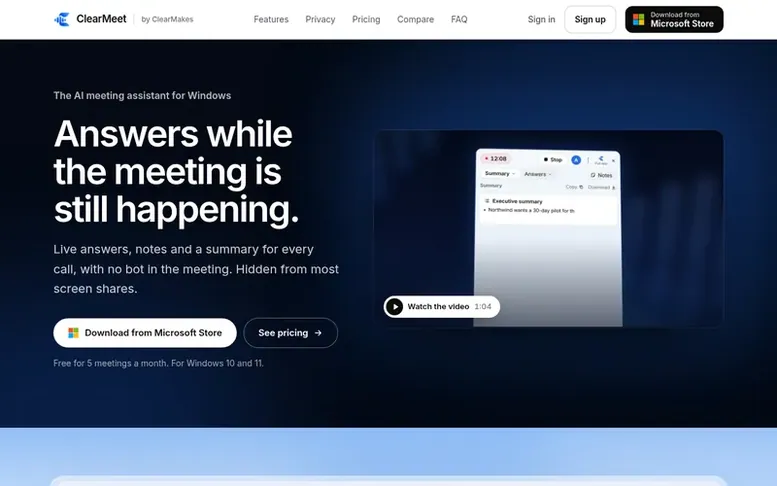
The ClearMeet homepage
ClearMeet is an AI meeting assistant for Windows that records and transcribes meetings in real-time, generates instant notes and summaries, and answers questions during calls without joining as a bot. The app works with Zoom, Microsoft Teams, Google Meet, Webex, Slack huddles and other apps that play audio through your computer.
All audio and recordings stay on your PC. For generating answers and notes, conversation text and questions are sent to ClearMakes' servers and to Google's Gemini model. When you share your screen on Windows 10 version 2004 and later, ClearMeet is hidden from most screen-sharing apps so others cannot see it.
Features include real-time transcription, automatic meeting summaries with action items, instant answers to questions asked during meetings, and the ability to attach files and notes for AI-generated responses. Recordings can be kept on your PC, and you can review any moment of the call. The app supports only English transcription and speech recognition.
Capabilities
- Instant meeting summaries and action items
- Live answers to questions during meetings
- Screen share privacy - hidden from most screen shares
- No bot joins the call
- Local audio processing - audio never leaves your PC
- Screen and audio recording on your PC
- Add notes and files for AI answers to reference
- Download summaries and notes in one click
Pricing
Pricing model: Freemium
Free: $0, 5 meetings per month up to 2 hours each, every feature. Pro: $20/month, 30 meeting hours per month, up to 4 hours per meeting. Plus: $40/month, 100 meeting hours per month, up to 6 hours per meeting. Team: $30/person/month for 3+ people, 40 meeting hours per person per month shared by team
Follow ClearMeet to get an email when they post a milestone, ship a new product or add a demo video.
ClearMeet fact sheet
| Community votes | 0 |
|---|---|
| Website | meet.clearmakes.com |
ClearMeet metrics
Vendor metrics for meet.clearmakes.com: Ahrefs Domain Rating and Majestic link data, with the delta since the last review.
- Domain Rating
- 4
- no change since last check
- Trust Flow
- 1
- no change since last check
- Citation Flow
- 20
- no change since last check
- Referring domains
- 3
- no change since last check
- External backlinks
- 6
- no change since last check
Vendor Domain Rating (Ahrefs) checked 11 Nov 2026, spec changed 8 Nov 2026. Vendor topic: Computers/Virtual Reality (1). Vendor Majestic data checked 8 Nov 2026, spec changed 8 Nov 2026. Link metrics supplied by Majestic. Trust Flow, Citation Flow and Topical Trust Flow are trademarks of Majestic-12 Ltd.
ClearMeet vendor domain
Open the vendor record
We read this from the registry's RDAP record on 11 Nov 2026, 08:29 UTC.
- Domain age
- 1 month
- Registered
- Expires
- Registrar
- GoDaddy.com, LLC
- DNSSEC
- Signed
ClearMeet post-launch report
| Measure | At launch, then latest |
|---|---|
| Domain Rating (Ahrefs) | 4 to 4 no change since launch 8 Nov 2026, then 11 Nov 2026 |
| Trust Flow (Majestic) | 1 first measured 8 Nov 2026 |
| Referring domains (Majestic) | 3 first measured 8 Nov 2026 |
Day 3 since launch. Next receipt: day 30, 8 Dec 2026. Many things move these figures, so a change is not proof of cause. Only stored readings are shown.
About to launch?
Plan your launch with our free playbook, from preparing your listing to choosing more launch directories.
- The week before
- On the day
- Week one
- Beyond launch
Buyer questions
Is ClearMeet free?
Yes. The Free plan gives you 5 meetings a month, up to 2 hours each, with every feature. Pro and Plus add more meeting time.
Can the other people in the meeting see it?
ClearMeet stays out of your screen share - on Windows 10 version 2004 and later, most screen-sharing apps can't capture its window. It doesn't join your call as a bot. Someone looking at your actual screen can see it.
Which meeting apps does it work with?
Zoom, Microsoft Teams, Google Meet, Webex, Slack huddles, phone apps on your PC, and anything that plays sound through your computer. Nothing needs to be installed in the meeting app.
What does ClearMeet send over the internet?
To write answers and notes, the text of the conversation and your question go to ClearMakes' server and to Google's Gemini model. Your audio and recordings never leave your PC. Files added to Notes are read on your PC, with only the parts needed sent as text with the question. Screenshots attached to questions are sent for the model to see.
Can I cancel any time?
Yes. You can cancel from Manage billing in the app or on your account page. You keep your plan until the end of the time you've paid for, then you're on Free. If you change your mind within 14 days of a payment, you get a full refund.
Leave a review for ClearMeet
No customer reviews of ClearMeet yet. Write the first. Customer reviews are free and nobody can buy them.
ClearMeet has a free listing. The owner can unlock the full profile with a paid launch for $5:
- Founder story (locked)
- Milestones (locked)
- Demo video (locked)
- Dofollow website link (locked)
Compare with
| # | Product | DR | Votes |
|---|---|---|---|
| 1 |  Media |
13 no change since last check | 0 votes. Log in to vote for MediaFlowSwift as a buyer |
| 2 |  Motion |
2 no change since last check | 0 votes. Log in to vote for MotionShine as a buyer |
| 3 |  youple |
0 no change since last check | 0 votes. Log in to vote for youple.tv as a buyer |
| 4 |  momentakeVideo delivery platform for videographers with branded galleries, cloud storage, and fast CDN streaming |
10 no change since last check | 0 votes. Log in to vote for momentake as a buyer |