Workflow automation
Quicktion
Save Emails to Your Favorite Tools Automatically
Forward emails to Notion, Google Sheets, Airtable, Linear, Trello, or Google Drive with automatic field mapping and optional AI extraction.
Overview
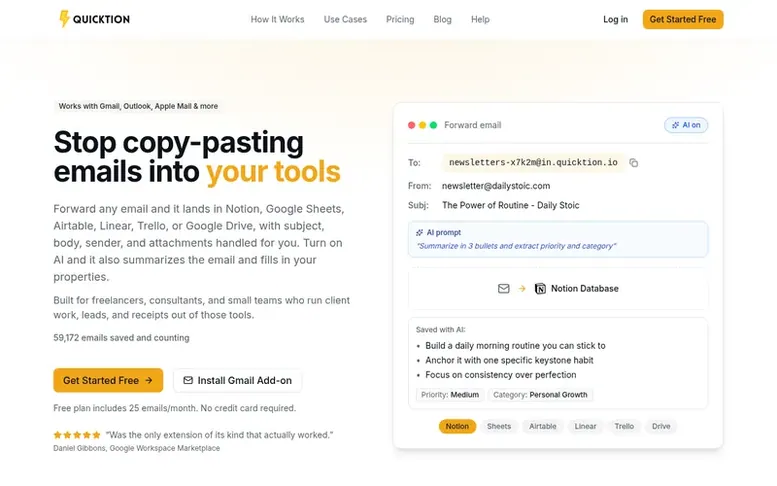
The Quicktion homepage
Quicktion saves emails into the tools you already work in. Forward an email to your Quicktion address, or click Save in the Gmail add-on, and it becomes a Notion page, a Google Sheets row, an Airtable record, a Linear issue, a Trello card, or a PDF in Google Drive. Subject, sender, date, body, and attachments are automatically mapped to your destination.
On the Pro plan, AI Email Intelligence reads every email and fills in your properties based on your custom prompts. The service supports forwarding from any email client including Gmail, Outlook, Apple Mail, Spark, Fastmail, Hey, and Thunderbird. Works for freelancers, consultants, and small teams managing client work, leads, receipts, and newsletters.
Capabilities
- Email forwarding to Notion, Google Sheets, Airtable, Linear, Trello, Google Drive
- Gmail add-on for one-click email saving
- AI Email Intelligence with custom prompts
- Smart auto-mapping of email fields
- Attachment support and upload
- Default value tagging
- Real-time activity feed
- Works with Gmail, Outlook, Apple Mail, and any email client
Follow Quicktion to get an email when they post a milestone, ship a new product or add a demo video.
Quicktion fact sheet
| Community votes | 0 |
|---|---|
| Founded | 2024 |
| Stage | Growing |
| Website | quicktion.io |
Quicktion metrics
Vendor metrics for quicktion.io: Ahrefs Domain Rating and Majestic link data, with the delta since the last review.
- Domain Rating
- 26
- +6 (up) since last check
- Trust Flow
- 18
- no change since last check
- Citation Flow
- 26
- no change since last check
- Referring domains
- 63
- no change since last check
- External backlinks
- 155
- no change since last check
Vendor Domain Rating (Ahrefs) checked 17 Nov 2026, spec changed 31 Oct 2026. Vendor topic: Arts/Photography (18). Vendor Majestic data checked 3 Oct 2026, spec changed 3 Oct 2026. Link metrics supplied by Majestic. Trust Flow, Citation Flow and Topical Trust Flow are trademarks of Majestic-12 Ltd.
Quicktion vendor domain
Open the vendor record
We read this from the registry's RDAP record on 16 Nov 2026, 11:52 UTC.
- Domain age
- 4 years
- Registered
- Expires
- Registrar
- Name.com, Inc.
- DNSSEC
- Not signed
Quicktion post-launch report
| Measure | At launch, then latest |
|---|---|
| Domain Rating (Ahrefs) | 17 to 26 +9 (up) since launch 3 Oct 2026, then 16 Nov 2026 |
| Trust Flow (Majestic) | 18 first measured 3 Oct 2026 |
| Referring domains (Majestic) | 63 first measured 3 Oct 2026 |
Checkpoints
- Day 302 Nov 2026DR 26 +9 (up) since launch0 visits sent
Day 44 since launch. Next receipt: day 60, 2 Dec 2026. Many things move these figures, so a change is not proof of cause. Only stored readings are shown.
About to launch?
Plan your launch with our free playbook, from preparing your listing to choosing more launch directories.
- The week before
- On the day
- Week one
- Beyond launch
Buyer questions
Which destinations does Quicktion support?
Quicktion supports Notion, Google Sheets, Airtable, Linear, Trello, and Google Drive. Each destination gets its own forwarding address and configuration. You can connect multiple accounts and create as many destinations as you need on the Pro plan.
How does email forwarding work?
When you create a destination, you get a unique email address like newsletters-x7k2m@in.quicktion.io. Any email sent to that address is automatically saved to your connected tool. You can forward manually or set up auto-forwarding rules.
What happens if I hit my monthly email limit?
On Free, additional emails are held until your billing cycle resets, and you'll receive a notification with your reset date and an upgrade option. On Pro, the same applies.
Can I cancel anytime?
Yes. You can cancel from your dashboard in one click. You'll keep Pro access through the end of your current billing period, then drop back to the Free plan automatically with no charges or penalties.
Do you offer refunds?
Yes. If Quicktion isn't working for you, email within 30 days of purchase and you'll receive a full refund. Billing runs through Paddle, which handles refunds in a few business days.
Leave a review for Quicktion
No customer reviews of Quicktion yet. Write the first. Customer reviews are free and nobody can buy them.
Quicktion has a free listing. The owner can unlock the full profile with a paid launch for $5:
- Founder story (locked)
- Milestones (locked)
- Demo video (locked)
- Dofollow website link (locked)
Compare with
| # | Product | DR | Votes |
|---|---|---|---|
| 1 |  RittoShow it once. Let Ritto AI handle the rest. |
18 no change since last check | 0 votes. Log in to vote for Ritto as a buyer |
| 2 |  interop |
55 no change since last check | 0 votes. Log in to vote for interop.io as a buyer |
| 3 |  FOMOCatches contradictions and duplicated work in your team's files, live |
0 no change since last check | 0 votes. Log in to vote for FOMO as a buyer |
| 4 |  FlokzuAI-powered BPM software for automating business processes without code |
51 +1 (up) since last check | 0 votes. Log in to vote for Flokzu as a buyer |