Productivity & Personal Tools
Screen Fasting
iPhone and iPad screen limiter using Assistive Access with a passcode you cannot access until your fast ends
Screen Fasting locks your iPhone or iPad using Apple's Assistive Access with a secure passcode held by the company, preventing cheating until your fast ends.
Overview
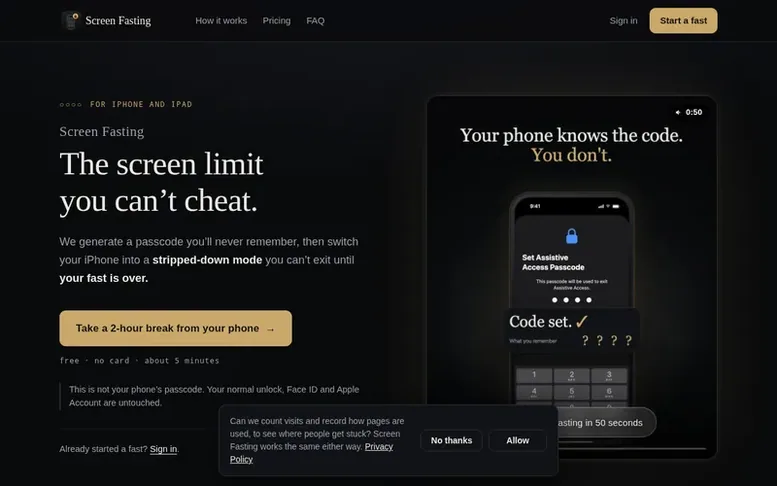
The Screen Fasting homepage
Screen Fasting is a screen time management tool that locks your iPhone or iPad into a stripped-down mode you cannot exit until your fasting period is over. You select 3 or 4 apps to keep accessible during your fast, and the service creates a random passcode by guiding you through each keypress mixed with decoy steps, so you never memorize the code. The passcode is stored on Screen Fasting's servers and emailed to you only when your fast ends. The free plan allows up to 5 fasts per month lasting 2 to 8 hours. The Pro plan, at $3.75 per month billed annually at $45 per year, offers unlimited fasts up to 30 days long plus weekly coaching from a real person who reviews your Screen Time and suggests ways to use your phone less.
Capabilities
- Choose 3-4 apps to remain accessible during fast
- Unbreakable Assistive Access passcode, not device password
- Voice-guided setup process
- Passcode hidden through decoy keypresses
- Passcode emailed upon fast completion
- Weekly human coaching on Pro plan
- Fasting log to track usage history
- Extend running fast, never shorten it
Pricing
Free: up to 5 fasts per month, 2 to 8 hours each. Pro: $3.75/mo (billed annually at $45/year) for unlimited fasts up to 30 days each, plus weekly human coaching.
Follow Screen Fasting to get an email when they post a milestone, ship a new product or add a demo video.
Screen Fasting fact sheet
| Community votes | 0 |
|---|---|
| Website | tryscreenfasting.com |
Screen Fasting metrics
Vendor metrics for tryscreenfasting.com: Ahrefs Domain Rating and Majestic link data, with the delta since the last review.
- Domain Rating
- 2
- +2 (up) since last check
- Trust Flow
- 0
- no change since last check
- Citation Flow
- 0
- no change since last check
- Referring domains
- 0
- no change since last check
- External backlinks
- 0
- no change since last check
Vendor Domain Rating (Ahrefs) checked 6 Nov 2026, spec changed 31 Oct 2026. Vendor Majestic data checked 25 Oct 2026, spec changed 25 Oct 2026. Link metrics supplied by Majestic. Trust Flow, Citation Flow and Topical Trust Flow are trademarks of Majestic-12 Ltd.
Screen Fasting vendor domain
Open the vendor record
We read this from the registry's RDAP record on 6 Nov 2026, 00:57 UTC.
- Domain age
- 2 months
- Registered
- Expires
- Registrar
- Cloudflare, Inc.
- DNSSEC
- Not signed
Screen Fasting post-launch report
| Measure | At launch, then latest |
|---|---|
| Domain Rating (Ahrefs) | 0 to 2 +2 (up) since launch 25 Oct 2026, then 6 Nov 2026 |
| Trust Flow (Majestic) | 0 first measured 25 Oct 2026 |
| Referring domains (Majestic) | 0 first measured 25 Oct 2026 |
Day 11 since launch. Next receipt: day 30, 24 Nov 2026. Many things move these figures, so a change is not proof of cause. Only stored readings are shown.
About to launch?
Plan your launch with our free playbook, from preparing your listing to choosing more launch directories.
- The week before
- On the day
- Week one
- Beyond launch
Buyer questions
What if there's an emergency?
You choose which apps stay reachable when you set up your fast — keep Calls and Messages and you're never cut off. Beyond that, the only way out is a full device erase.
Can I just turn Assistive Access off?
No. Leaving Assistive Access asks for the passcode, and you don't have it. That's the whole product.
Will you know my passcode?
Yes, deliberately: a code nobody could read could never be handed back to you. It sits on our servers as plain text behind your login. It isn't your device passcode — your normal unlock is untouched — and it does nothing for anyone who isn't holding your phone.
Does this work on Android?
No. Screen Fasting works on iPhone and iPad only.
What if I lose my laptop or clear my browser?
Your passcode is saved on our servers before your phone ever changes, so there is no moment where the phone has changed and nobody has the code. Sign in and it's still there.
Leave a review for Screen Fasting
No customer reviews of Screen Fasting yet. Write the first. Customer reviews are free and nobody can buy them.
Screen Fasting has a free listing. The owner can unlock the full profile with a paid launch for $5:
- Founder story (locked)
- Milestones (locked)
- Demo video (locked)
- Dofollow website link (locked)
Compare with
| # | Product | DR | Votes |
|---|---|---|---|
| 1 |  MyFrameworkTurn messy problems into clearer decisions with proven frameworks |
17 −1 (down) since last check | 1 votes. Log in to vote for MyFramework as a buyer |
| 2 |  LFG AlarmThe social alarm clock with superintelligence |
21 no change since last check | 0 votes. Log in to vote for LFG Alarm as a buyer |
| 3 |  ClivraA private visual clipboard history for Mac |
0 no change since last check | 0 votes. Log in to vote for Clivra as a buyer |
| 4 |  RenamerXAI file renamer and organizer with local-first processing |
1 no change since last check | 0 votes. Log in to vote for RenamerX as a buyer |