Productivity & Personal Tools

Snapix
Menu bar screenshot app for Mac with annotation, OCR, and privacy by design
Snapix is a screenshot tool for Mac that captures to your clipboard, includes a 16-tool editor for annotations and redaction, extracts text from images with
Overview
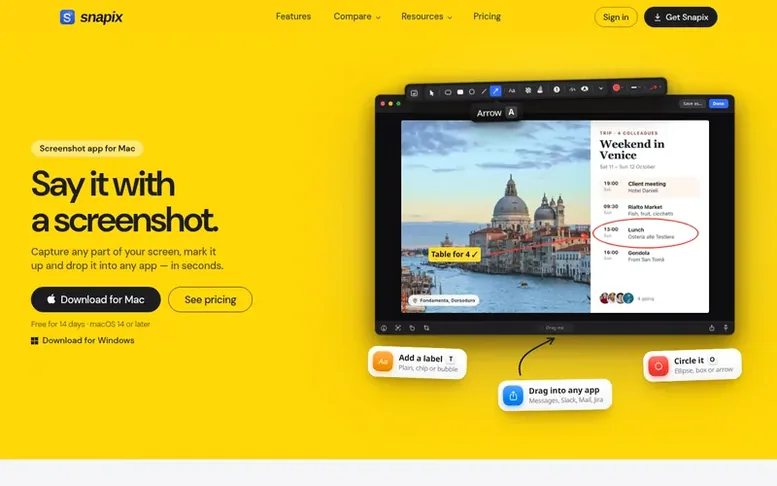
The Snapix homepage
Snapix is a screenshot app for macOS 14 and later that lives in your menu bar and replaces the built-in screenshot tool. It captures in six ways (area, window, full screen, repeat last area, self-timer, and text extraction) and copies every capture straight to your clipboard. The app includes a 16-tool annotation editor with arrows, shapes, text callouts, auto-numbered steps, emoji stickers, and a line-snapping highlighter. It can blur or pixelate sensitive data, extract text from images with on-device OCR, pin screenshots on top of other windows, and maintain a searchable history. Capture, annotation, and text recognition all run on your Mac, keeping your data private.
Capabilities
- Six capture modes: area, window, full screen, self-timer, text extraction, repeat last area
- 16-tool annotation editor with arrows, shapes, text, steps, emoji, highlighter
- On-device OCR text extraction
- Blur and pixelate for redacting sensitive data
- Pin screenshots on top of every window
- Searchable history of recent captures
- Automatic clipboard copy of every capture
- Customizable global hotkeys and keyboard shortcuts
- Background presets with gradients, padding, rounded corners and shadow
- Color picker and hex code to clipboard
Pricing
Pricing model: Freemium
Free 14-day trial (full access, no credit card), then €2.99/month, €23.88/year, or €67 lifetime
Follow Snapix to get an email when they post a milestone, ship a new product or add a demo video.
Snapix fact sheet
| Community votes | 0 |
|---|---|
| Website | snapix.app |
Snapix metrics
Vendor metrics for snapix.app: Ahrefs Domain Rating and Majestic link data, with the delta since the last review.
- Domain Rating
- 0
- no change since last check
- Trust Flow
- 0
- no change since last check
- Citation Flow
- 16
- no change since last check
- Referring domains
- 10
- no change since last check
- External backlinks
- 14
- no change since last check
Vendor Domain Rating (Ahrefs) checked 6 Nov 2026, spec changed 1 Nov 2026. Vendor Majestic data checked 1 Nov 2026, spec changed 1 Nov 2026. Link metrics supplied by Majestic. Trust Flow, Citation Flow and Topical Trust Flow are trademarks of Majestic-12 Ltd.
Snapix vendor domain
Open the vendor record
We read this from the registry's RDAP record on 5 Nov 2026, 21:40 UTC.
- Domain age
- 1 year
- Registered
- Expires
- Registrar
- Porkbun LLC
- DNSSEC
- Not signed
Snapix post-launch report
| Measure | At launch, then latest |
|---|---|
| Domain Rating (Ahrefs) | 0 to 0 no change since launch 1 Nov 2026, then 5 Nov 2026 |
| Trust Flow (Majestic) | 0 first measured 1 Nov 2026 |
| Referring domains (Majestic) | 10 first measured 1 Nov 2026 |
Day 4 since launch. Next receipt: day 30, 1 Dec 2026. Many things move these figures, so a change is not proof of cause. Only stored readings are shown.
About to launch?
Plan your launch with our free playbook, from preparing your listing to choosing more launch directories.
- The week before
- On the day
- Week one
- Beyond launch
Buyer questions
What exactly is Snapix?
Snapix is a screenshot app for Mac that lives in your menu bar. It replaces the built-in screenshot tool with six capture modes (area, window, full screen, repeat last area, self-timer, and text extraction), a 16-tool annotation editor, blur and pixelate for redacting, on-device OCR, pinned screenshots, and searchable capture history.
How is Snapix different from the built-in macOS screenshot tool?
Snapix puts every capture straight on your clipboard and adds 16 annotation tools (arrows that bend, shapes, text callouts, auto-numbered steps, emoji stickers, line-snapping highlighter), blur and pixelate for sensitive data, one-key on-device OCR, pinned floating screenshots, and capture history. All this is accessible from your menu bar with customizable global hotkeys.
Is Snapix really private?
Yes. Every capture, annotation, and OCR result is processed on your Mac. Snapix takes one-shot screenshots only with no screen recording and no background capture.
Can I switch plans later?
Yes. You can switch between monthly and annual plans anytime from Manage billing on your account. To move to a lifetime license, purchase it from the pricing page and your subscription stops renewing.
How does the free trial work?
Download Snapix and sign in with Apple or Google, and your 14-day free trial starts — no credit card. You get full access to every feature. When the trial ends, keep Snapix Pro for $2.49/month billed annually, $3.49 monthly, or $79 once.
Leave a review for Snapix
No customer reviews of Snapix yet. Write the first. Customer reviews are free and nobody can buy them.
Snapix has a free listing. The owner can unlock the full profile with a paid launch for $5:
- Founder story (locked)
- Milestones (locked)
- Demo video (locked)
- Dofollow website link (locked)
Compare with
| # | Product | DR | Votes |
|---|---|---|---|
| 1 |  MyFrameworkTurn messy problems into clearer decisions with proven frameworks |
17 −1 (down) since last check | 1 votes. Log in to vote for MyFramework as a buyer |
| 2 |  LFG AlarmThe social alarm clock with superintelligence |
21 no change since last check | 0 votes. Log in to vote for LFG Alarm as a buyer |
| 3 |  ClivraA private visual clipboard history for Mac |
0 no change since last check | 0 votes. Log in to vote for Clivra as a buyer |
| 4 |  RenamerXAI file renamer and organizer with local-first processing |
1 no change since last check | 0 votes. Log in to vote for RenamerX as a buyer |