Communication & Collaboration

SonicMeet
Real-time bilingual captions and translation for Google Meet, Zoom, and Microsoft Teams
SonicMeet fact sheet
| Community votes | 0 |
|---|---|
| Website | sonicmeet.app |
SonicMeet metrics
Vendor metrics for sonicmeet.app: Ahrefs Domain Rating and Majestic link data, with the delta since the last review.
- Domain Rating
- 8
- +1 (up) since last check
- Trust Flow
- 17
- no change since last check
- Citation Flow
- 21
- no change since last check
- Referring domains
- 60
- no change since last check
- External backlinks
- 179
- no change since last check
Vendor Domain Rating (Ahrefs) checked 17 Oct 2026, spec changed 17 Oct 2026. Vendor topic: Computers/Software/Operating Systems (17). Vendor Majestic data checked 12 Oct 2026, spec changed 12 Oct 2026. Link metrics supplied by Majestic. Trust Flow, Citation Flow and Topical Trust Flow are trademarks of Majestic-12 Ltd.
SonicMeet vendor domain
We read this from the registry's RDAP record on 16 Oct 2026, 22:50 UTC.
- Domain age
- 7 months
- Registered
- Expires
- Registrar
- CloudFlare, Inc.
- DNSSEC
- Not signed
A live captioning and translation tool that works in your browser or desktop app, capturing audio without joining the meeting.
Overview
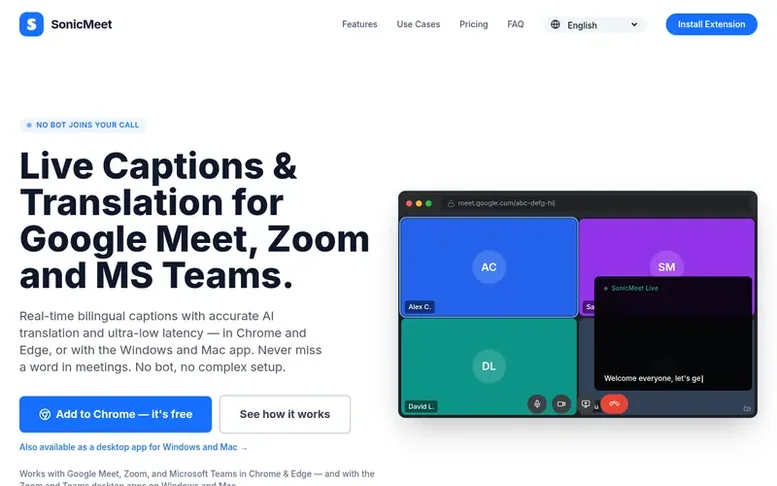
The SonicMeet homepage
SonicMeet provides live captions and translation for video meetings across Google Meet, Zoom, and Microsoft Teams. It runs as a Chrome or Edge extension for browser-based meetings, or as a desktop app for Windows and Mac that captures system audio. Unlike bot-based tools, SonicMeet works silently on your computer without joining the call, keeping captions visible only to you unless you share your screen.
The service supports real-time transcription in 62 languages and offers two translation modes: Instant for fast conversations with ultra-low latency, and Accurate for technical terms and natural phrasing. Users can take notes tied to the meeting timeline, access full transcripts and AI-generated summaries after calls, and review all meeting history in their account.
Plans range from a free tier with limited minutes to paid subscriptions offering 5 to 90 hours per month, plus AI credits for summaries. A Team plan allows shared pools of hours and credits across multiple members.
Capabilities
- Real-time bilingual captions in 62 languages
- Two translation modes: Instant and Accurate
- Browser extension for Chrome and Edge
- Desktop app for Windows and Mac
- AI meeting summaries
- Full transcript and meeting history
- Quick notes from caption lines
- Auto-stop after 5 minutes of silence
- Works on desktop clients and browser tabs
Pricing
Pricing model: Freemium
Free: 20 minutes one-time, 3 AI credits. Starter: $10/mo for 5 hours/month and 20 AI credits. Pro: $20/mo for 15 hours/month and 60 AI credits. Power: $39/mo for 40 hours/month and 200 AI credits. Ultra: $79/mo for 90 hours/month and 500 AI credits. Team: $25/seat/month (minimum 2 seats) with 15 hou
Compare and explore
See the alternatives to SonicMeet, Zivy vs SonicMeet, more in Communication & Collaboration.
Buyer questions
Does it work with Google Meet, Zoom, and Microsoft Teams?
Yes, all three platforms are supported. For browser-based meetings, add the Chrome or Edge extension and click Start in SonicMeet. For Zoom or Teams desktop clients, install the Windows or Mac app which captures system audio.
Can I take notes during the meeting?
Yes. You can tap any caption line to save it as a note instantly, or write freeform notes at any time. All notes are saved alongside the full transcript for review after the meeting.
How does the Team plan work?
The Team plan is $25 per seat per month with a 2-seat minimum. Each seat adds 15 hours and 60 AI credits to a shared pool. Members can draw from this pool based on their usage. You can add more seats anytime or purchase 50-hour blocks. For 50+ seats or invoicing, contact the company.
Do I need the extension or the desktop app?
If you join meetings in a browser tab, the Chrome & Edge extension is all you need — one click, nothing to download, and it runs on Windows, macOS and Linux. If you join from the Zoom or Teams desktop client, the extension can't reach that audio, but the desktop app for Windows or Mac can, because it captures the sound on your computer. Both share one account and one subscription, so you can install both.
Does a bot join my meeting?
No. SonicMeet picks up the audio right on your own computer — from the meeting tab with the extension, or from your system audio with the Windows and Mac app. Nothing joins the call, nothing is posted into the meeting, and no audio recording is kept: the captions appear only on your own screen, and other participants see them only if you share your screen with them visible. This is a key difference from tools like Otter.ai or Fireflies, which join the meeting as a bot.
Leave a review for SonicMeet
No customer reviews of SonicMeet yet. Write the first. Customer reviews are free and nobody can buy them.
SonicMeet has a free listing. The owner can unlock the full profile with a paid launch for $5:
- Founder story (locked)
- Milestones (locked)
- Demo video (locked)
- Dofollow website link (locked)
Compare with
| # | Product | DR | Votes |
|---|---|---|---|
| 1 |  ZivyTurn chaotic workplace communication into calm collaboration with AI-powered message prioritization ZivyTurn chaotic workplace communication into calm collaboration with AI-powered message prioritization |
33 +1 (up) since last check | 0 votes. Log in to vote for Zivy as a buyer |