Productivity & Personal Tools

Wake Boom
An alarm you can't out-argue
An alarm app for iPhone and Android that requires you to complete a mission before it stops, with six challenge types, streaks, leaderboards, and support for 29
Overview
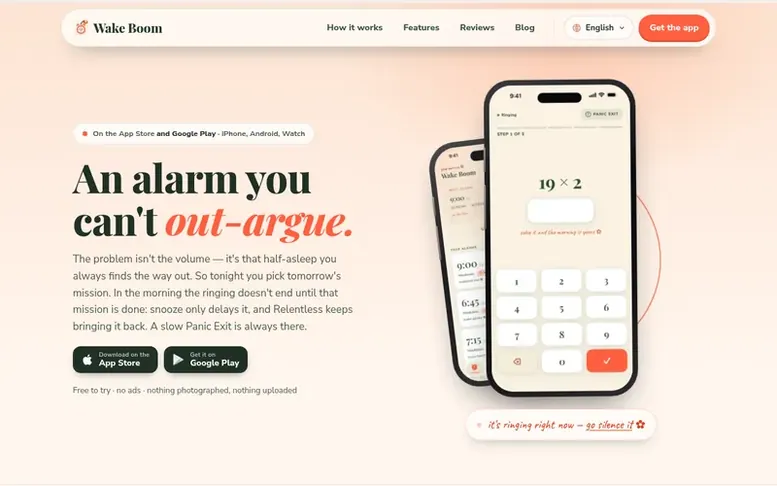
The Wake Boom homepage
Wake Boom is an alarm app for iPhone and Android that prevents you from dismissing it without completing a chosen mission. You set your alarm the night before and select a challenge: solve a math problem, photograph a specific object, scan a QR code, shake your phone a certain number of times, match memory pairs, or tap words in order. The alarm continues ringing until the mission is complete, with a Panic Exit available for genuine emergencies. The app includes features like streak tracking for consecutive on-time wake-ups, a weekly leaderboard to rank against friends, and a visual garden that grows blooms for clean mornings. Wake Boom supports 29 languages with original ringtones composed for each language, full right-to-left layouts for Arabic, Farsi, Hebrew and Urdu, and includes Apple Watch and Wear OS companions. The app is free to try, contains no ads, and offers Premium features including sleep insights from Health data and music integration with Apple Music.
Capabilities
- Streak tracking with visual garden
- Weekly leaderboard
- 29 languages with original ringtones
- Apple Watch and Wear OS companions
- Relentless mode keeps alarm returning
- Sleep insights from Health app
- Time zone pinning
Pricing
Pricing model: Freemium
Follow Wake Boom to get an email when they post a milestone, ship a new product or add a demo video.
Wake Boom fact sheet
| Community votes | 0 |
|---|---|
| Based in | Minnesota, United States |
| Website | wakeboom.app |
Wake Boom metrics
Vendor metrics for wakeboom.app: Ahrefs Domain Rating and Majestic link data, with the delta since the last review.
- Domain Rating
- 11
- −2 (down) since last check
- Trust Flow
- 6
- no change since last check
- Citation Flow
- 17
- no change since last check
- Referring domains
- 10
- no change since last check
- External backlinks
- 31
- no change since last check
Vendor Domain Rating (Ahrefs) checked 6 Nov 2026, spec changed 30 Oct 2026. Vendor topic: Computers/Internet/On the Web (6). Vendor Majestic data checked 28 Oct 2026, spec changed 28 Oct 2026. Link metrics supplied by Majestic. Trust Flow, Citation Flow and Topical Trust Flow are trademarks of Majestic-12 Ltd.
Wake Boom vendor domain
Open the vendor record
We read this from the registry's RDAP record on 3 Nov 2026, 14:48 UTC.
- Domain age
- 4 months
- Registered
- Expires
- Registrar
- Namecheap Inc.
- DNSSEC
- Not signed
Wake Boom post-launch report
| Measure | At launch, then latest |
|---|---|
| Domain Rating (Ahrefs) | 13 to 11 −2 (down) since launch 28 Oct 2026, then 5 Nov 2026 |
| Trust Flow (Majestic) | 6 first measured 28 Oct 2026 |
| Referring domains (Majestic) | 10 first measured 28 Oct 2026 |
Day 8 since launch. Next receipt: day 30, 27 Nov 2026. Many things move these figures, so a change is not proof of cause. Only stored readings are shown.
About to launch?
Plan your launch with our free playbook, from preparing your listing to choosing more launch directories.
- The week before
- On the day
- Week one
- Beyond launch
Buyer questions
How do I dismiss an alarm?
Complete the mission you selected when setting the alarm: solve a math problem, photograph an object, shake your phone, or perform another challenge. With Relentless mode enabled, the alarm returns until you're fully up, though a Panic Exit option is always available for genuine emergencies.
Why didn't my alarm fire?
Check that notification permission is enabled in iOS Settings and that a Focus or Do Not Disturb schedule hasn't silenced it.
What happens to my alarms when I restore my phone?
Alarms are stored locally on your device. If you restored from a backup that excluded app data, your alarms will be gone and you'll need to set them up again.
How do I manage my Wake Boom Premium subscription?
Wake Boom Premium is billed through your Apple ID. To view, change, or cancel your subscription, open iOS Settings, tap your name, go to Subscriptions, find Wake Boom, and make changes there. Cancellations take effect at the end of the current billing period.
How is my data handled and deleted?
Your alarms and settings live locally on your device, so deleting the app removes them. Photos from optional photo missions are discarded immediately after verification and not kept. For other data concerns, contact hi@wakeboom.app.
Leave a review for Wake Boom
No customer reviews of Wake Boom yet. Write the first. Customer reviews are free and nobody can buy them.
Wake Boom has a free listing. The owner can unlock the full profile with a paid launch for $5:
- Founder story (locked)
- Milestones (locked)
- Demo video (locked)
- Dofollow website link (locked)
Compare with
| # | Product | DR | Votes |
|---|---|---|---|
| 1 |  MyFrameworkTurn messy problems into clearer decisions with proven frameworks |
17 −1 (down) since last check | 1 votes. Log in to vote for MyFramework as a buyer |
| 2 |  LFG AlarmThe social alarm clock with superintelligence |
21 no change since last check | 0 votes. Log in to vote for LFG Alarm as a buyer |
| 3 |  ClivraA private visual clipboard history for Mac |
0 no change since last check | 0 votes. Log in to vote for Clivra as a buyer |
| 4 |  RenamerXAI file renamer and organizer with local-first processing |
1 no change since last check | 0 votes. Log in to vote for RenamerX as a buyer |