Video & meetings

AI Toolbox
Free browser-based video, audio, and image tools that process files locally with no upload required
AI Toolbox offers free browser-based media tools for splitting, converting, and editing videos and audio without uploading files to servers.
Overview
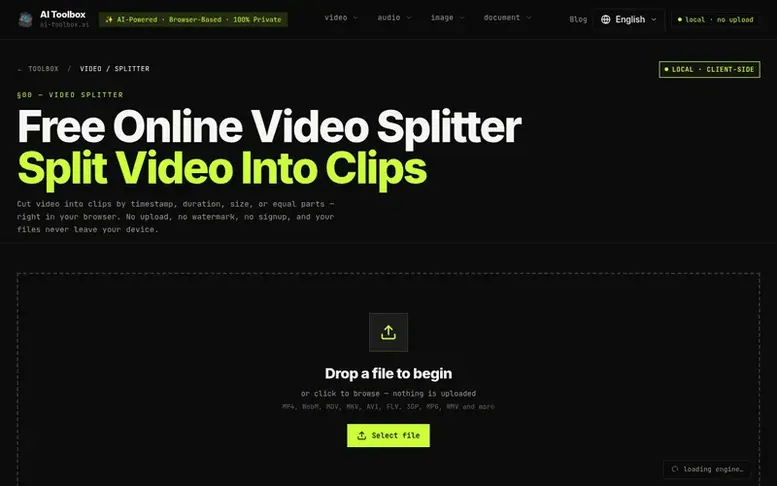
The AI Toolbox homepage
AI Toolbox is a free collection of browser-based media tools that run entirely on your device using WebAssembly technology. The suite includes a video splitter for cutting clips by timestamp, duration, file size, or equal parts, a video converter supporting 12 formats, audio extraction and splitting tools, and an image cropper. All processing happens locally in your browser without any file uploads, account creation, or watermarks on output files.
Capabilities
- Fast Mode with stream copy for instant splitting
- Re-encode mode for frame-accurate cuts
- Support for multiple video formats
- Convert between 12 video formats
- Extract audio from videos in multiple formats
- Crop images with preset aspect ratios
Pricing
Pricing model: Free
Follow AI Toolbox to get an email when they post a milestone, ship a new product or add a demo video.
AI Toolbox fact sheet
| Community votes | 0 |
|---|---|
| Website | ai-toolbox.ai |
AI Toolbox metrics
Vendor metrics for ai-toolbox.ai: Ahrefs Domain Rating and Majestic link data, with the delta since the last review.
- Domain Rating
- 19
- no change since last check
- Trust Flow
- 10
- no change since last check
- Citation Flow
- 29
- no change since last check
- Referring domains
- 80
- no change since last check
- External backlinks
- 10,910
- no change since last check
Vendor Domain Rating (Ahrefs) checked 6 Nov 2026, spec changed 25 Oct 2026. Vendor topic: Regional/Asia (10). Vendor Majestic data checked 25 Oct 2026, spec changed 25 Oct 2026. Link metrics supplied by Majestic. Trust Flow, Citation Flow and Topical Trust Flow are trademarks of Majestic-12 Ltd.
AI Toolbox vendor domain
Open the vendor record
We read this from the registry's RDAP record on 6 Nov 2026, 22:58 UTC.
- Domain age
- 1 year
- Registered
- Expires
- Registrar
- NameCheap, Inc.
- DNSSEC
- Not signed
AI Toolbox post-launch report
| Measure | At launch, then latest |
|---|---|
| Domain Rating (Ahrefs) | 19 to 19 no change since launch 25 Oct 2026, then 6 Nov 2026 |
| Trust Flow (Majestic) | 10 first measured 25 Oct 2026 |
| Referring domains (Majestic) | 80 first measured 25 Oct 2026 |
Day 11 since launch. Next receipt: day 30, 24 Nov 2026. Many things move these figures, so a change is not proof of cause. Only stored readings are shown.
About to launch?
Plan your launch with our free playbook, from preparing your listing to choosing more launch directories.
- The week before
- On the day
- Week one
- Beyond launch
Buyer questions
Is it safe to split video online with this free video splitter?
Yes. This free video splitter processes your file locally in the browser. Your video is not uploaded to a server, and the output clips have no watermark.
What video formats can I split?
You can split MP4, WebM, MOV, MKV, AVI, FLV, 3GP, MPG, WMV, and many other video formats. The tool automatically detects the format and processes it accordingly.
What's the difference between Fast Mode and normal mode?
Fast Mode lets you split video instantly using stream copy without re-encoding, but cuts may snap to the nearest keyframe. Normal mode re-encodes for frame-accurate cuts and lets you change the output format and quality.
Can I split video files of any size?
Yes. Since processing happens in your browser, there's no file size limit imposed by servers. You can split video of any size — your computer's memory is the only constraint. For very large files, consider using Fast Mode for quicker processing.
Can I change the output format of my clips?
Yes. Disable Fast Mode and select your preferred container (MP4, WebM, MOV, MKV, AVI, etc.) plus quality level. The tool will re-encode each clip accordingly.
Leave a review for AI Toolbox
No customer reviews of AI Toolbox yet. Write the first. Customer reviews are free and nobody can buy them.
AI Toolbox has a free listing. The owner can unlock the full profile with a paid launch for $5:
- Founder story (locked)
- Milestones (locked)
- Demo video (locked)
- Dofollow website link (locked)
Compare with
| # | Product | DR | Votes |
|---|---|---|---|
| 1 |  momentakeVideo delivery platform for videographers with branded galleries, cloud storage, and fast CDN streaming |
10 no change since last check | 0 votes. Log in to vote for momentake as a buyer |
| 2 |  TMPlayerStream Telegram videos on TV, phones, Windows, macOS and Linux while they download, free and open source |
10 +8 (up) since last check | 0 votes. Log in to vote for TMPlayer as a buyer |
| 3 |  Momentum cinemaOS |
3 no change since last check | 0 votes. Log in to vote for Momentum cinemaOS as a buyer |
| 4 |  Video |
0 no change since last check | 0 votes. Log in to vote for VideoAlpha Sovereign as a buyer |