Productivity & Personal Tools

Cyanote
Notes, tasks, calendar, habits and a clipboard manager in one local-first app for Mac and Windows
A one-time purchase desktop app combining notes, to-dos, calendar, habit tracking and clipboard management in a single window, with no account or subscription
Overview
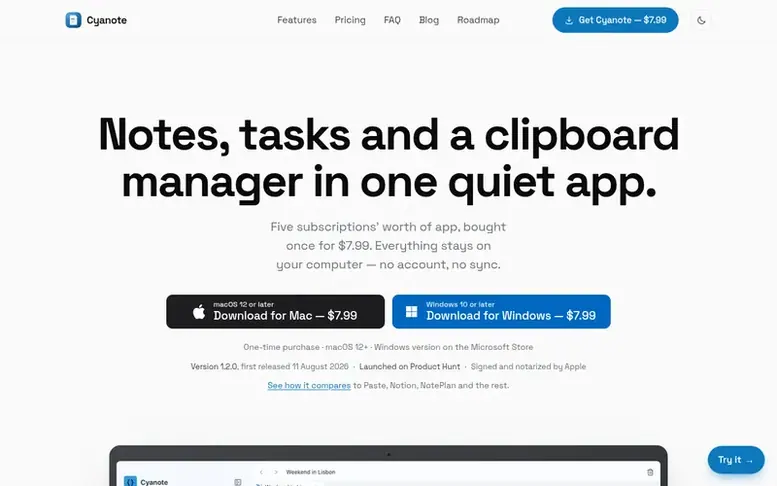
The Cyanote homepage
Cyanote is a local-first desktop application for Mac and Windows that consolidates five common productivity tools into one. It includes a note editor with code syntax highlighting, a to-do list with kanban board, a calendar view, habit tracking with streak counters, and a system-wide clipboard manager storing up to 1,000 items. All data is stored locally on your computer in a single SQLite database file with no cloud syncing, account creation, or telemetry. The app features 15 built-in themes, instant full-text search, routines with Pomodoro timer, and markdown import/export capabilities. Designed to work completely offline, it requires no internet connection after installation and maintains functionality even if the website becomes unavailable.
Capabilities
- Notes and code notes with syntax highlighting
- To-dos and kanban board
- Calendar with events, due tasks and habits
- Habit tracking with streak counters
- System-wide clipboard manager with up to 1,000 items
- Routines with Pomodoro timer
- 15 built-in themes and custom typography
- Instant full-text search across all notes
- Markdown import and JSON export
- Password-protected individual notes
Pricing
Pricing model: Paid
$7.99 USD one-time purchase for Mac; $7.99 USD one-time purchase for Windows on Microsoft Store. No subscription, no recurring charges.
Follow Cyanote to get an email when they post a milestone, ship a new product or add a demo video.
Cyanote fact sheet
| Community votes | 0 |
|---|---|
| Founded | 2026 |
| Stage | Startup |
| Website | cyanote.app |
Cyanote metrics
Vendor metrics for cyanote.app: Ahrefs Domain Rating and Majestic link data, with the delta since the last review.
- Domain Rating
- 8
- −1 (down) since last check
- Trust Flow
- 5
- no change since last check
- Citation Flow
- 24
- no change since last check
- Referring domains
- 19
- no change since last check
- External backlinks
- 60
- no change since last check
Vendor Domain Rating (Ahrefs) checked 12 Nov 2026, spec changed 12 Nov 2026. Vendor topic: Recreation/Outdoors (5). Vendor Majestic data checked 9 Nov 2026, spec changed 9 Nov 2026. Link metrics supplied by Majestic. Trust Flow, Citation Flow and Topical Trust Flow are trademarks of Majestic-12 Ltd.
Cyanote vendor domain
Open the vendor record
We read this from the registry's RDAP record on 11 Nov 2026, 06:22 UTC.
- Domain age
- 3 months
- Registered
- Expires
- Registrar
- CloudFlare, Inc.
- DNSSEC
- Not signed
Cyanote post-launch report
| Measure | At launch, then latest |
|---|---|
| Domain Rating (Ahrefs) | 9 to 9 no change since launch 9 Nov 2026, then 11 Nov 2026 |
| Trust Flow (Majestic) | 5 first measured 9 Nov 2026 |
| Referring domains (Majestic) | 19 first measured 9 Nov 2026 |
Day 3 since launch. Next receipt: day 30, 9 Dec 2026. Many things move these figures, so a change is not proof of cause. Only stored readings are shown.
About to launch?
Plan your launch with our free playbook, from preparing your listing to choosing more launch directories.
- The week before
- On the day
- Week one
- Beyond launch
Buyer questions
How do I get Cyanote after paying?
On Mac, a download link and licence key appear in your email after checkout. Install by dragging Cyanote to Applications and pasting the key—no account creation needed. The licence is checked only once on first launch, so the app works offline permanently. On Windows, you buy and install from the Microsoft Store like any other app, with no licence key required and updates delivered through the Store.
Where is my data stored?
Your data is stored in a single SQLite database file on your own computer. On Mac it's in ~/Library/Application Support/; on Windows it's in C:\Users\\Cyanote. Nothing is uploaded anywhere—Cyanote has no account system, sync service, analytics or telemetry. You can move the file to any external drive and Cyanote will use it there.
Does Cyanote sync between computers or to my phone?
No. Cyanote has no sync service by design—sync requires a server, which requires an account, and the app is built specifically not to have one. You can manually place the database file in a folder synced by iCloud, Dropbox or Syncthing, but that's unsupported. There is no iPhone, iPad or Android app and none is planned.
Leave a review for Cyanote
No customer reviews of Cyanote yet. Write the first. Customer reviews are free and nobody can buy them.
Cyanote has a free listing. The owner can unlock the full profile with a paid launch for $5:
- Founder story (locked)
- Milestones (locked)
- Demo video (locked)
- Dofollow website link (locked)
Compare with
| # | Product | DR | Votes |
|---|---|---|---|
| 1 |  MyFrameworkTurn messy problems into clearer decisions with proven frameworks |
17 −1 (down) since last check | 1 votes. Log in to vote for MyFramework as a buyer |
| 2 |  Sermon |
1 no change since last check | 0 votes. Log in to vote for SermonMate as a buyer |
| 3 |  nTiliaOffline notes app for field journalists and researchers with on-device transcription, encrypted vault, and bilingual citable journal |
12 no change since last check | 0 votes. Log in to vote for nTilia as a buyer |
| 4 |  Leaf |
0 no change since last check | 0 votes. Log in to vote for LeafRead as a buyer |