Mac & desktop utilities

DiskClue
Mac disk space analyzer that shows storage usage as a color-coded map and lets you clean up safely
Native Mac storage analyzer that visualizes disk usage with a color-coded map, finds duplicates and large files, and moves items to Trash only after your
Overview
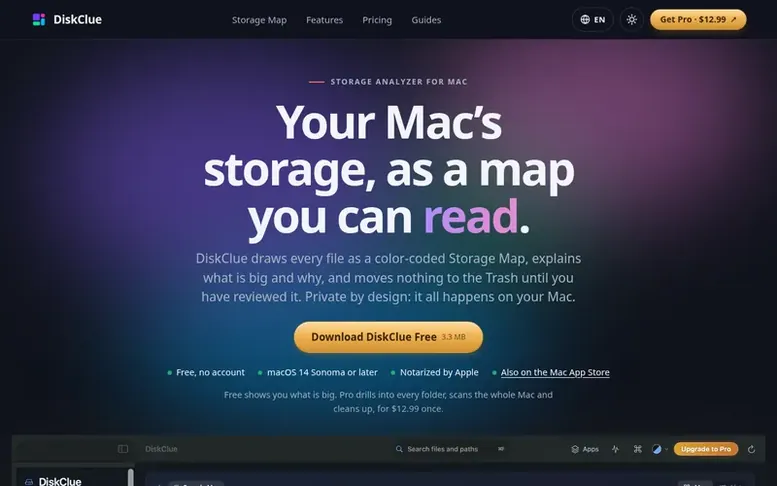
The DiskClue homepage
DiskClue is a native Mac storage analyzer that scans your Mac and displays every file as a color-coded Storage Map, helping you understand what is using your disk space. The app shows file types and folders with drill-down exploration, identifies duplicate files by content, reveals app footprints and their data, and compares scans over time to track storage changes.
The free version includes the top-level Storage Map and first folder level, file lists, duplicate finder, app footprints, System Data breakdown, and a System Monitor. DiskClue Pro unlocks the complete map hierarchy, Full Mac scans, cleanup tools that move reviewed items to the macOS Trash, and an app uninstaller.
DiskClue is designed around safety: scanning is read-only, nothing is deleted outright, and every cleanup item is reviewed before moving to the Trash, which you can empty later. The app works on macOS 14 Sonoma or later on Apple silicon and Intel Macs, stores all scan data on your device, and requires no account or tracking.
Capabilities
- Color-coded Storage Map with file type visualization and folder drill-down
- Duplicate finder that matches files by content, not just names
- App footprints showing what each app uses including Library data
- What Changed? comparison to track storage growth between scans
- System Monitor showing CPU, memory, disk and network alongside storage
- Quick Search to find any file in your scan instantly
- App uninstaller that moves apps and their Library data to Trash
- Four appearance themes: Midnight, Aurora, Ocean and Forest
- Full Mac scan option to map everything on your startup disk
Pricing
Pricing model: Freemium
DiskClue Free: $0. DiskClue Pro (lifetime license): $12.99 one-time, excluding taxes.
Follow DiskClue to get an email when they post a milestone, ship a new product or add a demo video.
DiskClue fact sheet
| Community votes | 0 |
|---|---|
| Website | diskclue.com |
DiskClue metrics
Vendor metrics for diskclue.com: Ahrefs Domain Rating and Majestic link data, with the delta since the last review.
- Domain Rating
- 3
- +1 (up) since last check
- Trust Flow
- 14
- no change since last check
- Citation Flow
- 22
- no change since last check
- Referring domains
- 5
- no change since last check
- External backlinks
- 9
- no change since last check
Vendor Domain Rating (Ahrefs) checked 6 Nov 2026, spec changed 5 Nov 2026. Vendor topic: Computers/Software/Operating Systems (14). Vendor Majestic data checked 4 Nov 2026, spec changed 4 Nov 2026. Link metrics supplied by Majestic. Trust Flow, Citation Flow and Topical Trust Flow are trademarks of Majestic-12 Ltd.
DiskClue vendor domain
Open the vendor record
We read this from the registry's RDAP record on 6 Nov 2026, 05:09 UTC.
- Domain age
- 2 months
- Registered
- Expires
- Registrar
- GoDaddy.com, LLC
- DNSSEC
- Not signed
DiskClue post-launch report
| Measure | At launch, then latest |
|---|---|
| Domain Rating (Ahrefs) | 2 to 3 +1 (up) since launch 4 Nov 2026, then 5 Nov 2026 |
| Trust Flow (Majestic) | 14 first measured 4 Nov 2026 |
| Referring domains (Majestic) | 5 first measured 4 Nov 2026 |
Day 1 since launch. Next receipt: day 30, 4 Dec 2026. Many things move these figures, so a change is not proof of cause. Only stored readings are shown.
About to launch?
Plan your launch with our free playbook, from preparing your listing to choosing more launch directories.
- The week before
- On the day
- Week one
- Beyond launch
Buyer questions
Is DiskClue free?
Yes. Folder scans, the top-level Storage Map and its first folder level, Overview, file lists, duplicate findings, app footprints, System Data breakdown, What Changed? and System Monitor are free. DiskClue Pro is a one-time $12.99 license (no subscription) that unlocks the complete map hierarchy, Full Mac scans, reviewed Trash actions, the app uninstaller and premium appearances.
Does DiskClue delete anything by itself?
No. Scanning is read-only, and nothing moves until you review the exact items and confirm. Supported cleanups move items to the macOS Trash, never straight to permanent deletion, and each file is checked again just before it moves. Space is only reclaimed once you empty the Trash.
Does it upload my files or need an account?
No account is needed and scan results never leave your Mac. File names, paths, sizes and scan history stay on the device. The only network use is Pro license activation, which sends your license key and Mac name to the payment provider, never file names or scan data.
Which Macs does it run on?
macOS 14 Sonoma or later, on Apple silicon and Intel Macs.
Is Pro a subscription?
No. Pro is a one-time $12.99 license, excluding taxes. There is no renewal.
Leave a review for DiskClue
No customer reviews of DiskClue yet. Write the first. Customer reviews are free and nobody can buy them.
DiskClue has a free listing. The owner can unlock the full profile with a paid launch for $5:
- Founder story (locked)
- Milestones (locked)
- Demo video (locked)
- Dofollow website link (locked)
Compare with
| # | Product | DR | Votes |
|---|---|---|---|
| 1 |  ChoteriNative macOS menu bar utilities that stay out of your way |
1 no change since last check | 0 votes. Log in to vote for Choteri as a buyer |
| 2 |  Tool |
8 +4 (up) since last check | 0 votes. Log in to vote for ToolKITZ as a buyer |
| 3 |  ShediMac cleaner for developers that finds wasted space, explains every item, and removes only what you choose |
5 −1 (down) since last check | 0 votes. Log in to vote for Shedi as a buyer |
| 4 | EverywhereFind any file on your Mac, instantly | 24 −1 (down) since last check | 0 votes. Log in to vote for Everywhere as a buyer |