Productivity & Personal Tools

GlassNudge
The reminder you can't ignore
GlassNudge fact sheet
| Community votes | 0 |
|---|---|
| Website | glassnudge.app |
GlassNudge metrics
Vendor metrics for glassnudge.app: Ahrefs Domain Rating and Majestic link data, with the delta since the last review.
- Domain Rating
- 0
- no change since last check
- Trust Flow
- 1
- no change since last check
- Citation Flow
- 23
- no change since last check
- Referring domains
- 69
- no change since last check
- External backlinks
- 90
- no change since last check
Vendor Domain Rating (Ahrefs) checked 16 Oct 2026, spec changed 9 Oct 2026. Vendor topic: Science/Environment (1). Vendor Majestic data checked 9 Oct 2026, spec changed 9 Oct 2026. Link metrics supplied by Majestic. Trust Flow, Citation Flow and Topical Trust Flow are trademarks of Majestic-12 Ltd.
GlassNudge vendor domain
We read this from the registry's RDAP record on 16 Oct 2026, 14:17 UTC.
- Domain age
- 5 months
- Registered
- Expires
- Registrar
- Porkbun LLC
- DNSSEC
- Not signed
A macOS desktop reminder app that blocks your screen until you deal with reminders, ensuring you never miss deadlines or forget important tasks.
Overview
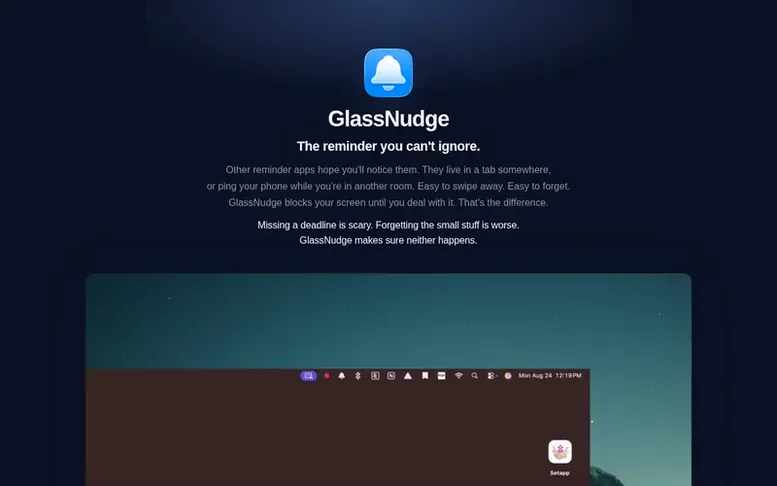
The GlassNudge homepage
GlassNudge is a desktop reminder app for macOS that takes a different approach to notifications. Instead of letting reminders hide in tabs or get swiped away, it blocks your entire screen until you actively deal with each reminder. The app sits quietly in your menu bar and lets you set reminders with plain language, handling both short-term and long-term tasks.
Designed with time blindness in mind, GlassNudge includes quiet hours for focus time and smart snooze options. All data stays on your Mac with no accounts, servers, or tracking. The Pro version adds AI-powered natural language input, unlimited reminders, and additional snooze options, while the Free version allows up to 3 active reminders.
Capabilities
- Full-screen takeover reminders that block your entire screen
- Menu bar access with one-click reminder creation
- Quiet hours to block reminders during focus time
- Smart snooze options
- Local data storage with no accounts or servers
- Pause all reminders feature
Pricing
Free: up to 3 active reminders. Pro: $4.99 USD one-time purchase with unlimited reminders, AI-powered natural language input, quiet hours, and more snooze options. Also available on Setapp as a one-time standalone purchase with Pro features included.
Buyer questions
How do I install GlassNudge?
Open the DMG file and drag GlassNudge into your Applications folder. No installer is required. Then launch the app, click the bell in your menu bar, and set your first reminder.
Is my data private and secure?
Yes. All reminders stay on your Mac with no accounts, servers, or tracking. If you use AI parsing, only the reminder text you type is sent to your chosen AI provider, or stays entirely on your Mac if you use a local LLM.
Can I snooze reminders?
Yes. GlassNudge includes smart snooze options. When you snooze a reminder, it will come back and remind you again until you actually deal with it.
Leave a review for GlassNudge
No customer reviews of GlassNudge yet. Write the first. Customer reviews are free and nobody can buy them.
GlassNudge has a free listing. The owner can unlock the full profile with a paid launch for $5:
- Founder story (locked)
- Milestones (locked)
- Demo video (locked)
- Dofollow website link (locked)
Compare with
| # | Product | DR | Votes |
|---|---|---|---|
| 1 |  FocusDeckBuild your study ritual once and run it every session with progress tracking FocusDeckBuild your study ritual once and run it every session with progress tracking |
2 no change since last check | 0 votes. Log in to vote for FocusDeck as a buyer |
| 2 |  FlowroomFocus together, silently FlowroomFocus together, silently |
0 no change since last check | 0 votes. Log in to vote for Flowroom as a buyer |
| 3 |  EasySwitchControl Mac, Windows and Linux computers with one keyboard and mouse, share clipboard and files, then turn another computer into a real second display. EasySwitchControl Mac, Windows and Linux computers with one keyboard and mouse, share clipboard and files, then turn another computer into a real second display. |
20 −1 (down) since last check | 0 votes. Log in to vote for EasySwitch as a buyer |
| 4 |  WensaFree resume builder with ATS-ready templates to create professional resumes online WensaFree resume builder with ATS-ready templates to create professional resumes online |
2 no change since last check | 0 votes. Log in to vote for Wensa as a buyer |