Productivity & Personal Tools

OAS – Outlook Assistant Suite
Automatically organise your Outlook email with smart rules, archiving, and follow-up tracking
A Windows Outlook extension that automatically organizes email, cleans up inboxes, archives messages intelligently, and tracks follow-ups using customizable
Overview
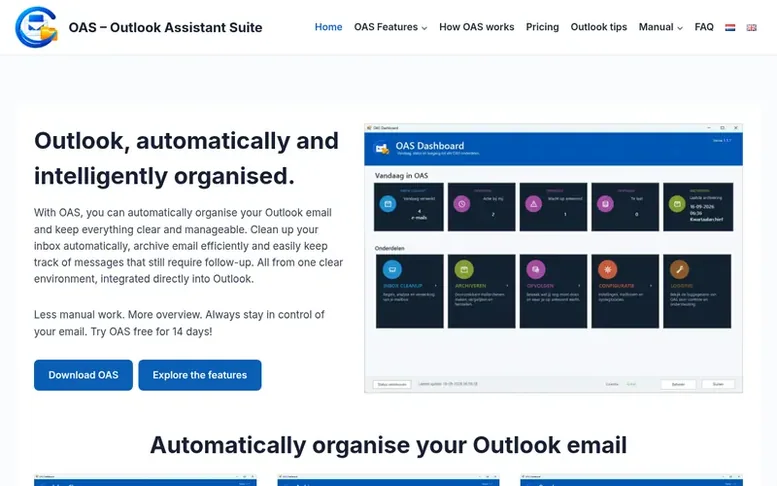
The OAS – Outlook Assistant Suite homepage
OAS – Outlook Assistant Suite is an extension for Microsoft Outlook that helps users automatically organize their email and maintain a clear inbox. The software provides three main features: Inbox Cleanup automatically processes recurring email based on user-defined rules for senders, subjects, and email types; Smart Archiving allows users to organize archived messages using custom rules and folders, with options to structure by time period; and Follow-up tracking lets users monitor emails requiring action or awaiting replies, with automatic recognition of incoming responses.
Designed for Windows 10 and Windows 11 with Outlook for Windows, OAS integrates directly into Outlook and requires no technical knowledge to configure. The application is digitally signed by Innosterex and available in 7 languages. Users can try OAS free for 14 days before choosing between an Annual Licence with access to new versions or a Lifetime Licence for the major version purchased.
Capabilities
- Automatic inbox cleanup with customizable rules
- Intelligent email archiving with custom folder organization
- Follow-up tracking for emails requiring action or replies
- Rule management and testing before activation
- Time-period based archive organization
- Automatic reply recognition for follow-ups
- Archive history and audit trail
- Available in 7 languages
Pricing
Pricing model: Freemium
Annual Licence: €19.95 including VAT per year (€16.49 excluding VAT); Lifetime Licence: €32.50 including VAT one-time purchase (€26.86 excluding VAT)
Follow OAS – Outlook Assistant Suite to get an email when they post a milestone, ship a new product or add a demo video.
OAS – Outlook Assistant Suite fact sheet
| Community votes | 0 |
|---|---|
| Based in | Netherlands |
| Website | outlookassistant.nl |
OAS – Outlook Assistant Suite metrics
Vendor metrics for outlookassistant.nl: Ahrefs Domain Rating and Majestic link data, with the delta since the last review.
- Domain Rating
- 18
- no change since last check
- Trust Flow
- 1
- no change since last check
- Citation Flow
- 10
- no change since last check
- Referring domains
- 2
- no change since last check
- External backlinks
- 12
- no change since last check
Vendor Domain Rating (Ahrefs) checked 12 Nov 2026, spec changed 9 Nov 2026. Vendor topic: Arts/Literature (1). Vendor Majestic data checked 9 Nov 2026, spec changed 9 Nov 2026. Link metrics supplied by Majestic. Trust Flow, Citation Flow and Topical Trust Flow are trademarks of Majestic-12 Ltd.
OAS – Outlook Assistant Suite vendor domain
Open the vendor record
We read this from the registry's RDAP record on 11 Nov 2026, 04:51 UTC.
- Domain age
- 4 months
- Registered
- Expires
- Not published
- Registrar
- Registrar.eu
- DNSSEC
- Signed
OAS – Outlook Assistant Suite post-launch report
| Measure | At launch, then latest |
|---|---|
| Domain Rating (Ahrefs) | 18 to 18 no change since launch 9 Nov 2026, then 12 Nov 2026 |
| Trust Flow (Majestic) | 1 first measured 9 Nov 2026 |
| Referring domains (Majestic) | 2 first measured 9 Nov 2026 |
Day 3 since launch. Next receipt: day 30, 9 Dec 2026. Many things move these figures, so a change is not proof of cause. Only stored readings are shown.
About to launch?
Plan your launch with our free playbook, from preparing your listing to choosing more launch directories.
- The week before
- On the day
- Week one
- Beyond launch
Compare and explore
See the alternatives to OAS – Outlook Assistant Suite, CaughtShipping vs OAS – Outlook Assistant Suite, dormscape vs OAS – Outlook Assistant Suite, Mobeera Office vs OAS – Outlook Assistant Suite, OAS – Outlook Assistant Suite vs RIPEN, Clivra vs OAS – Outlook Assistant Suite, OAS – Outlook Assistant Suite vs Seeded, more in Productivity & Personal Tools or startups in Netherlands.
Buyer questions
Can I try OAS before purchasing?
Yes, you can use OAS free for 14 days. After the trial, you can choose between an Annual Licence or a Lifetime Licence. The trial is not automatically converted into a paid licence.
Do I need technical knowledge to use OAS?
No, OAS is designed to be configured and used through a clear and straightforward interface. When you start OAS for the first time, it helps you configure the most important settings.
Can OAS automatically process new incoming email?
Yes, while Outlook is running, OAS can automatically process new incoming email according to your active Cleanup rules. You decide which rules are active and OAS gives you insight into the processing performed.
Is the Annual Licence a subscription?
No, the Annual Licence is not automatically renewed. Approximately one month before your licence expires, you receive a reminder and can decide whether to renew for another year or choose another licence type.
What are the system requirements for OAS?
OAS 1.1.1 is designed for Windows 10 and Windows 11 and requires Microsoft Outlook for Windows.
Leave a review for OAS – Outlook Assistant Suite
No customer reviews of OAS – Outlook Assistant Suite yet. Write the first. Customer reviews are free and nobody can buy them.
OAS – Outlook Assistant Suite has a free listing. The owner can unlock the full profile with a paid launch for $5:
- Founder story (locked)
- Milestones (locked)
- Demo video (locked)
- Dofollow website link (locked)
Compare with
| # | Product | DR | Votes |
|---|---|---|---|
| 1 |  MyFrameworkTurn messy problems into clearer decisions with proven frameworks |
17 −1 (down) since last check | 1 votes. Log in to vote for MyFramework as a buyer |
| 2 |  Sermon |
1 no change since last check | 0 votes. Log in to vote for SermonMate as a buyer |
| 3 |  nTiliaOffline notes app for field journalists and researchers with on-device transcription, encrypted vault, and bilingual citable journal |
12 no change since last check | 0 votes. Log in to vote for nTilia as a buyer |
| 4 |  Leaf |
0 no change since last check | 0 votes. Log in to vote for LeafRead as a buyer |