Productivity & Personal Tools
Zizeg
Preview and Source. Both editable.
Zizeg fact sheet
| Community votes | 0 |
|---|---|
| Stage | Established |
| Based in | United States |
| Website | zizeg.app |
Zizeg metrics
Vendor metrics for zizeg.app: Ahrefs Domain Rating and Majestic link data, with the delta since the last review.
- Domain Rating
- 0
- no change since last check
- Trust Flow
- 10
- no change since last check
- Citation Flow
- 17
- no change since last check
- Referring domains
- 11
- no change since last check
- External backlinks
- 83
- no change since last check
Vendor Domain Rating (Ahrefs) checked 16 Oct 2026, spec changed 4 Oct 2026. Vendor topic: Regional/Asia (10). Vendor Majestic data checked 4 Oct 2026, spec changed 4 Oct 2026. Link metrics supplied by Majestic. Trust Flow, Citation Flow and Topical Trust Flow are trademarks of Majestic-12 Ltd.
Zizeg vendor domain
We read this from the registry's RDAP record on 17 Oct 2026, 01:51 UTC.
- Domain age
- 2 months
- Registered
- Expires
- Registrar
- CloudFlare, Inc.
- DNSSEC
- Not signed
A native macOS Markdown editor where Preview and Source are both fully editable and stay in sync in the same plain .md file.
Overview
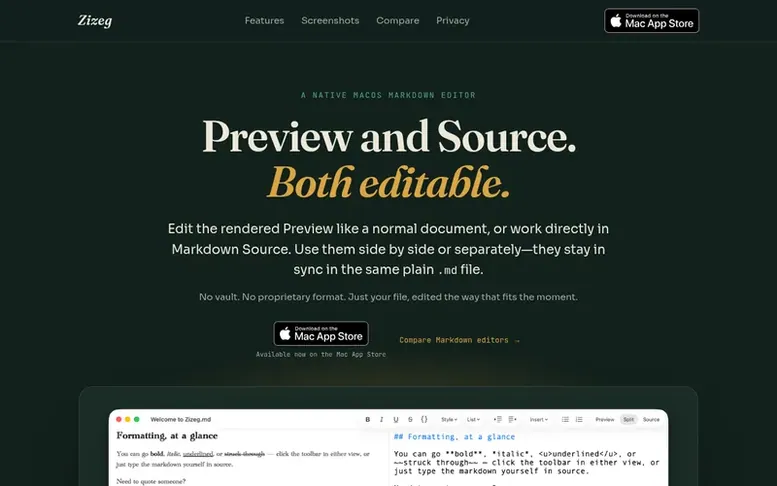
The Zizeg homepage
Zizeg is a native macOS Markdown editor that lets you edit both the rendered Preview and raw Markdown Source directly. Use them side by side or separately, and they stay in sync in the same plain .md file.
The application offers three ways to work: Preview mode for editing the rendered document, Split mode to keep both editors visible, and Source mode to work with the Markdown syntax directly. All views share the same toolbar, menus, and shortcuts.
Zizeg handles real Markdown workflows with support for headings, lists, tables, links, code blocks, formatting, and task lists. It includes features like undo, find, autosave, light and dark themes, and can manage image assets in a sibling folder or embed them for portability. The editor sanitizes content when rendering or exporting and blocks remote images by default.
It is designed to work with AI-generated Markdown, allowing you to review and edit documents visually or in raw source while keeping them as plain, portable Markdown files.
Capabilities
- Edit rendered Preview and Markdown Source with full editing capability
- Side-by-side and separate view modes
- Undo, Find, and autosave
- Light and dark themes
- Image asset management with portable embedding
- Remote image blocking and content safety
- HTML and PDF export with remote asset control
- Table of contents and row number navigation
Pricing
Pricing model: Freemium
Free to view. Editing and export unlocked with lifetime purchase ($14.99 USD) or subscription options: 12 months ($9.99) or 3 months ($2.99). Subscriptions include 7-day free trial.
Compare and explore
See the alternatives to Zizeg, Zizeg vs AllInOneTools, esigna vs Zizeg, Zizeg vs JustMarkdown, Zizeg vs Rune, Zizeg vs Quickrefs, Zizeg vs Coppice, more in Productivity & Personal Tools or startups in United States.
Buyer questions
What makes Zizeg different from other Markdown editors?
Zizeg has four key differentiators: Preview and Source are equal editing surfaces with the same toolbar, menus, and shortcuts; it works directly with ordinary Markdown on disk with no library or proprietary database; it uses native Mac conventions including document tabs, menus, toolbar, autosave, and Finder files; and it controls remote content by keeping remote images blocked until you approve them without rewriting the Markdown.
What file format does Zizeg use?
Zizeg saves to plain .md files. There is no vault, import step, or proprietary format. The document stays as ordinary Markdown on disk.
Is Zizeg suitable for AI-generated Markdown?
Yes. Zizeg is especially useful for AI-generated Markdown like READMEs, instruction files, specifications, plans, changelogs, and summaries. You can review and correct them visually or in raw source, and every document stays plain, portable Markdown that can be handed back to an AI agent.
How does Zizeg handle remote images and security?
Zizeg sanitizes content when rendering or exporting, flags unsupported content, and asks before loading remote images. Remote images remain blocked by default until you approve them, without rewriting the Markdown behind your back. Your saved source remains yours.
Leave a review for Zizeg
No customer reviews of Zizeg yet. Write the first. Customer reviews are free and nobody can buy them.
Zizeg has a free listing. The owner can unlock the full profile with a paid launch for $5:
- Founder story (locked)
- Milestones (locked)
- Demo video (locked)
- Dofollow website link (locked)
Compare with
| # | Product | DR | Votes |
|---|---|---|---|
| 1 |  FocusDeckBuild your study ritual once and run it every session with progress tracking FocusDeckBuild your study ritual once and run it every session with progress tracking |
2 no change since last check | 0 votes. Log in to vote for FocusDeck as a buyer |
| 2 |  FlowroomFocus together, silently FlowroomFocus together, silently |
0 no change since last check | 0 votes. Log in to vote for Flowroom as a buyer |
| 3 |  EasySwitchControl Mac, Windows and Linux computers with one keyboard and mouse, share clipboard and files, then turn another computer into a real second display. EasySwitchControl Mac, Windows and Linux computers with one keyboard and mouse, share clipboard and files, then turn another computer into a real second display. |
20 −1 (down) since last check | 0 votes. Log in to vote for EasySwitch as a buyer |
| 4 |  WensaFree resume builder with ATS-ready templates to create professional resumes online WensaFree resume builder with ATS-ready templates to create professional resumes online |
2 no change since last check | 0 votes. Log in to vote for Wensa as a buyer |