Mac & desktop utilities
AmpleCapacity
Shows what is taking up space on your Mac and what you can safely move
A Mac storage management app that scans your disk to identify rebuildable caches, installers, and other recoverable files without making changes until you
Overview
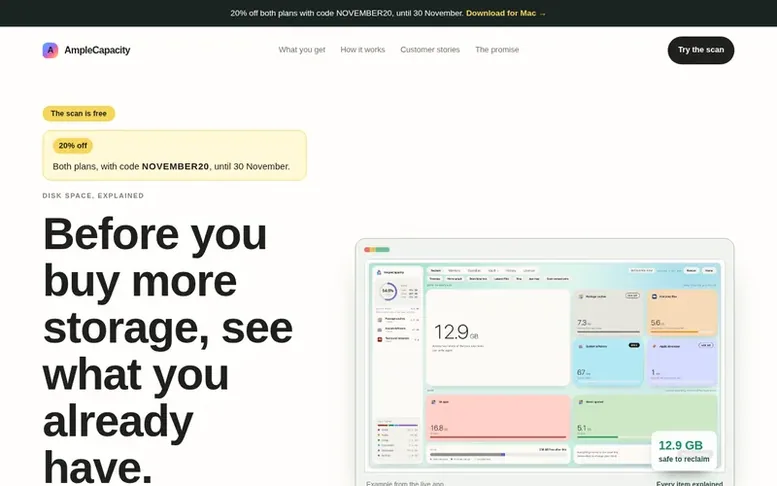
The AmpleCapacity homepage
AmpleCapacity helps Mac users reclaim disk space by identifying what is taking it up and explaining what can be safely removed. The app scans your Mac to find rebuildable caches, old installers, and temporary files that applications can recreate, then explains each one in plain language before you decide what to do.
The process works in three steps: scan your disk without making any changes, review explanations of what each file is and why it is there, and choose what to reclaim through a recovery vault that lets you restore items if you need them. Nothing moves until you choose it, and you get to see your potential saving before deciding whether to buy more storage or cloud capacity.
The free scan shows how much space you could reclaim and what is causing your disk to fill up. AmpleCapacity aims to let you delay or avoid expensive storage upgrades by giving you the information to understand your Mac's storage and keep control over what gets removed.
Capabilities
- Free disk scan without account or purchase
- Plain English explanations for each file
- Recovery vault to restore deleted items
- Read-only scanning that does not change files
- Local-first processing on your Mac
- Groups files into categories like builds, caches, and downloads
Pricing
Pricing model: Freemium
Follow AmpleCapacity to get an email when they post a milestone, ship a new product or add a demo video.
AmpleCapacity fact sheet
| Community votes | 0 |
|---|---|
| Website | amplecapacity.com |
AmpleCapacity metrics
Vendor metrics for amplecapacity.com: Ahrefs Domain Rating and Majestic link data, with the delta since the last review.
- Domain Rating
- 0
- no change since last check
- Trust Flow
- 3
- no change since last check
- Citation Flow
- 15
- no change since last check
- Referring domains
- 1
- no change since last check
- External backlinks
- 3
- no change since last check
Vendor Domain Rating (Ahrefs) checked 6 Nov 2026, spec changed 25 Oct 2026. Vendor topic: Computers/Software/Operating Systems (2). Vendor Majestic data checked 25 Oct 2026, spec changed 25 Oct 2026. Link metrics supplied by Majestic. Trust Flow, Citation Flow and Topical Trust Flow are trademarks of Majestic-12 Ltd.
AmpleCapacity vendor domain
Open the vendor record
We read this from the registry's RDAP record on 6 Nov 2026, 06:23 UTC.
- Domain age
- 2 months
- Registered
- Expires
- Registrar
- Cloudflare, Inc.
- DNSSEC
- Not signed
AmpleCapacity post-launch report
| Measure | At launch, then latest |
|---|---|
| Domain Rating (Ahrefs) | 0 to 0 no change since launch 25 Oct 2026, then 6 Nov 2026 |
| Trust Flow (Majestic) | 3 first measured 25 Oct 2026 |
| Referring domains (Majestic) | 1 first measured 25 Oct 2026 |
Day 11 since launch. Next receipt: day 30, 24 Nov 2026. Many things move these figures, so a change is not proof of cause. Only stored readings are shown.
About to launch?
Plan your launch with our free playbook, from preparing your listing to choosing more launch directories.
- The week before
- On the day
- Week one
- Beyond launch
Buyer questions
How much does the scan cost?
The scan is free. You do not need an account or to make a purchase before scanning your Mac.
Does the app collect data about my Mac or files?
No. The scan stays on your Mac and the app collects nothing about you or your files. The only network calls are a weekly licence check that sends only a one-way fingerprint of your key, not your name, email, or any file information.
What happens if I delete something important?
Selected items go to a recovery vault first, so you can put them back if you need them. The app shows you the consequence before asking you to make a change.
How does the app explain what files are?
The app groups files into categories like builds, caches, downloads, and app data and explains them in plain English rather than technical jargon, so you know what made each file and why it is there.
Leave a review for AmpleCapacity
No customer reviews of AmpleCapacity yet. Write the first. Customer reviews are free and nobody can buy them.
AmpleCapacity has a free listing. The owner can unlock the full profile with a paid launch for $5:
- Founder story (locked)
- Milestones (locked)
- Demo video (locked)
- Dofollow website link (locked)
Compare with
| # | Product | DR | Votes |
|---|---|---|---|
| 1 |  Disk |
3 +1 (up) since last check | 0 votes. Log in to vote for DiskClue as a buyer |
| 2 |  ChoteriNative macOS menu bar utilities that stay out of your way |
1 no change since last check | 0 votes. Log in to vote for Choteri as a buyer |
| 3 |  Tool |
8 +4 (up) since last check | 0 votes. Log in to vote for ToolKITZ as a buyer |
| 4 |  ShediMac cleaner for developers that finds wasted space, explains every item, and removes only what you choose |
5 −1 (down) since last check | 0 votes. Log in to vote for Shedi as a buyer |